Today's biggest option bets, on one page.
Paste one message into Claude. It finds the largest opening call and put buys of the session, looks up every company behind them, and builds a page you can open from the chat or straight out of your folder.
You write no code and install nothing. About three minutes the first time, and a few seconds every day after that.
- Contracts
- 6
- Tickers
- 5
- Bullish
- $1.3M
- Bearish
- $13.6M
| CDNS | 2027-01-15 300P | $12,581,212 |
| PI | 2026-11-20 155P | $760,057 |
| TSM | 2026-10-30 437.5C | $680,750 |
| IREN | 2026-11-13 27.5C | $323,301 |
| PBRA | 2027-03-19 17.5P | $274,920 |
Two filters, built by the Unusual Whales desk.
Out of every option trade in the market, these keep a few dozen a day. Both look for the same thing in opposite directions: someone opening a large new position and paying up to get it.
Call buys, at least 500 contracts and $250,000 in a single order, out of the money, expiring within six months, filled at the ask, opening a new position.
The same, in puts. Both skip spreads and multi-leg trades, because one leg of a spread does not tell you which way the trader is leaning.
Four steps. Three of them are once, ever.
Steps 1 to 3 set Claude up to reach Unusual Whales. Once they are done, getting tomorrow's flow is step 4 on its own.
- Time
- About 3 minutesThen seconds a day
- You need
- Claude and an API keyDesktop app
- You write
- No codeOne paste
- 1
Connect Unusual Whales
once, everThis link opens the right screen. Click Add in the top right, then Add custom connector, and paste the address below with your own key from unusualwhales.com/dashboard/api in place of the placeholder.
Open Connectors in ClaudeConnector URLhttps://api.unusualwhales.com/api/mcp?token=YOUR_API_KEY
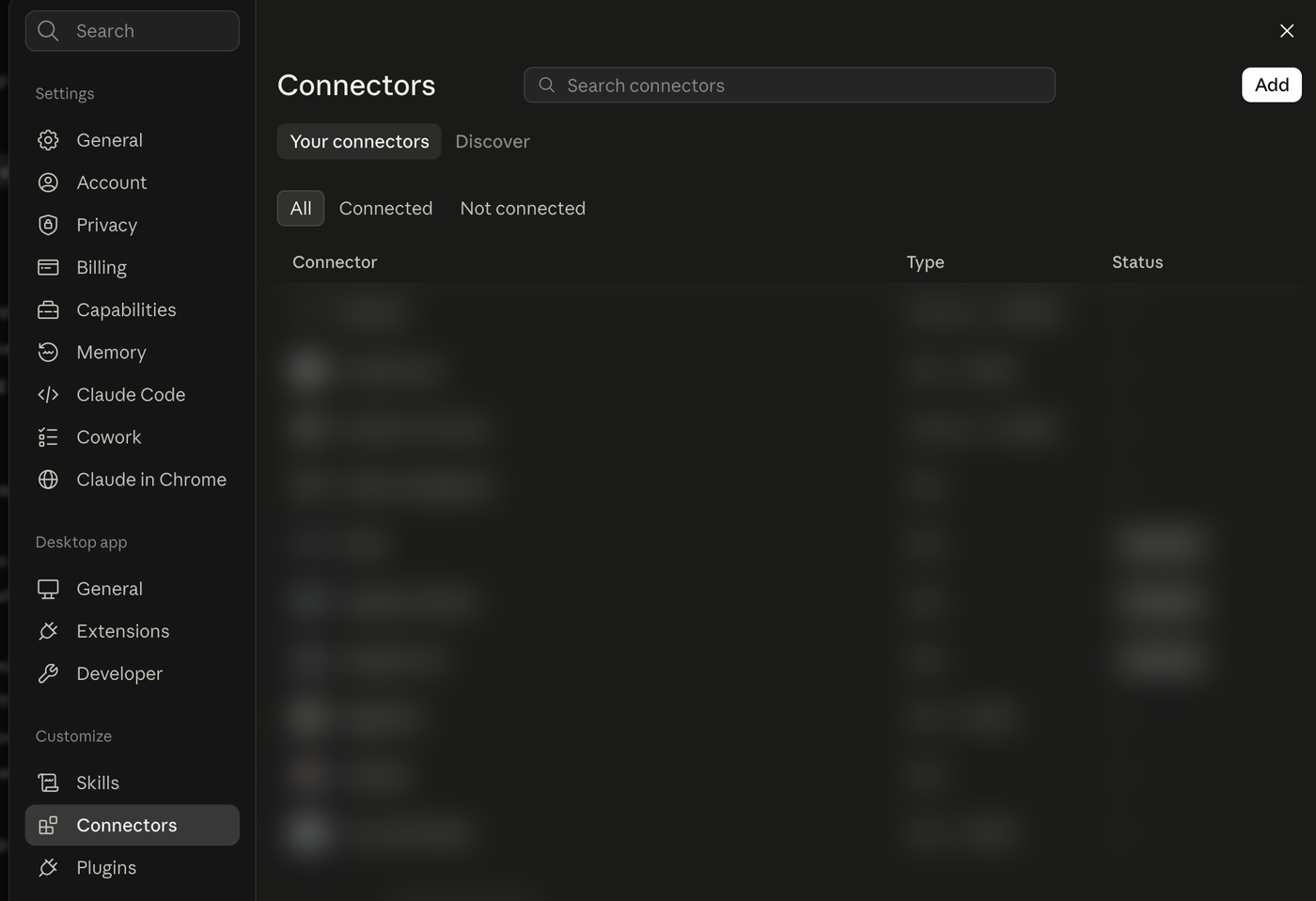
Connectors lives under Customize, not Settings. The Add button is top right. Your key is inside that address, so the whole string is a password. It goes in that box and nowhere else. Not into a chat message, a screenshot or a repo. Prefer a video? Our setup page has a short one.
- 2
Say yes once instead of fifty times
once, everDo this while you are still on that screen, or Claude asks your permission for every single call. Click the Unusual Whales connector you just added, scroll to Tool permissions, and set it to Always allow.
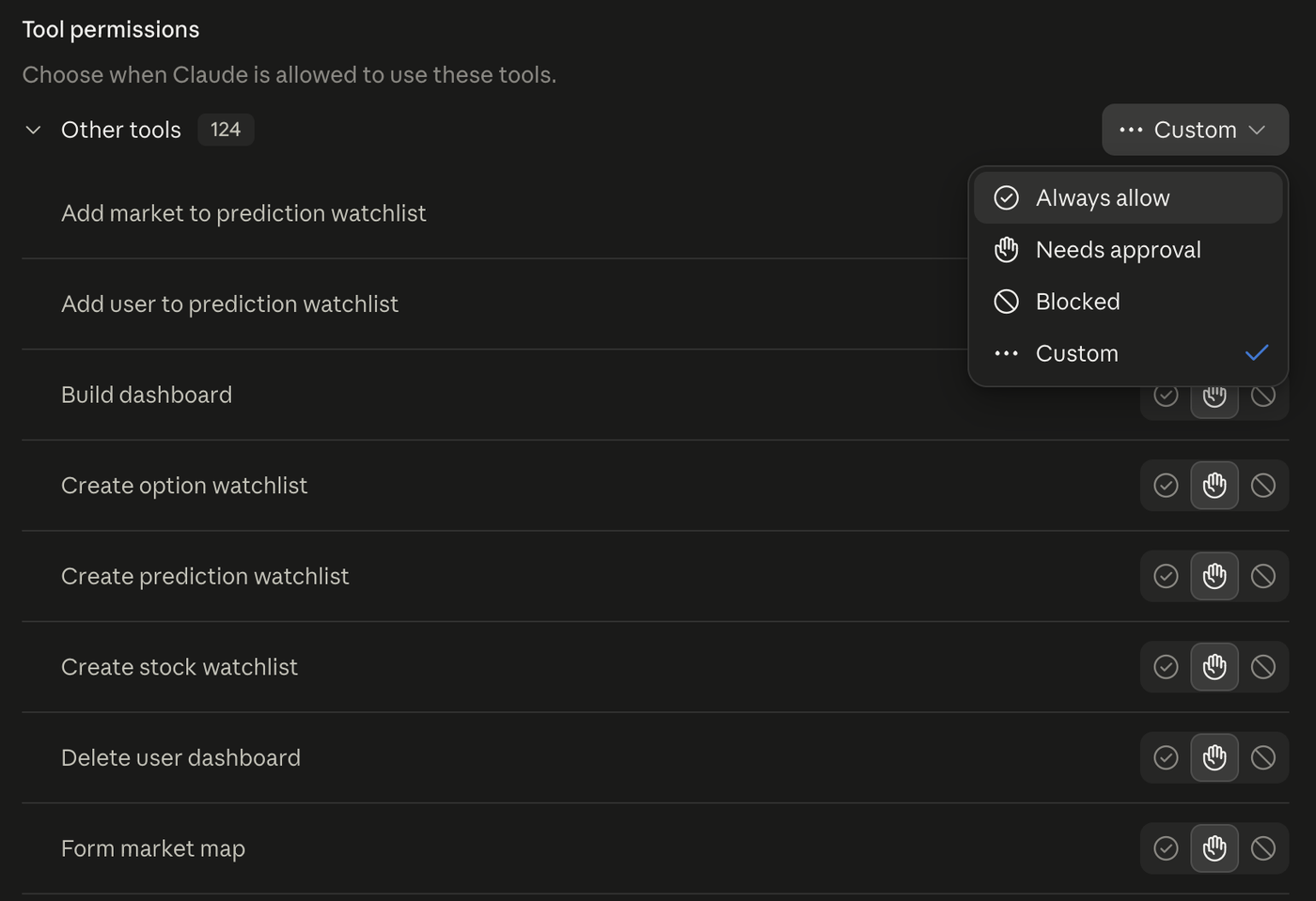
All 124 tools in one group, and one dropdown. Everything this project uses only reads market data. A handful of the 124 can write to your account, creating and deleting watchlists, and nothing here ever calls them. If you would rather keep those gated, pick Custom instead and leave the create and delete tools on Needs approval.
- 3
Give Claude a folder to write into
once, everMake a folder called UnusualWhales in Finder or File Explorer. In Claude, click Project or folder under the message box and pick it. That folder is where your page gets saved.
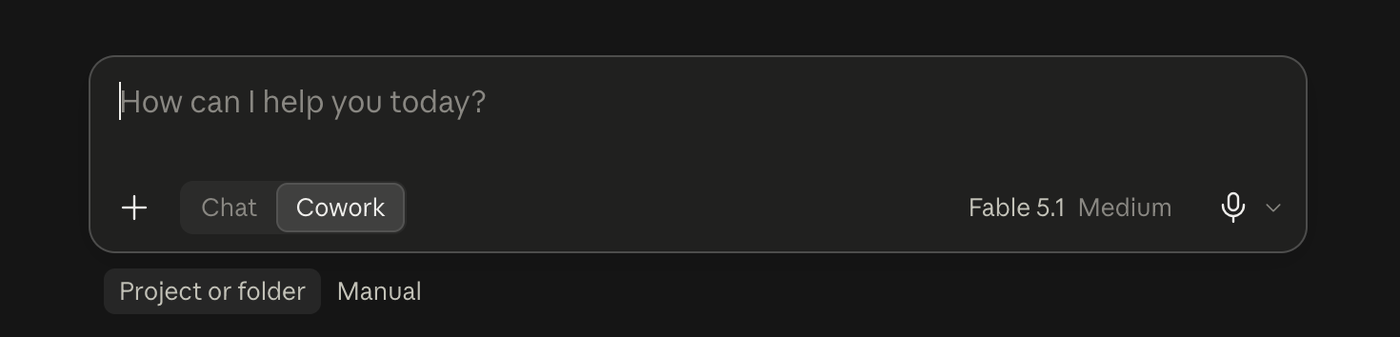
Cowork, then Project or folder. Some versions of Claude show a Chat / Cowork toggle here. If yours does, set it to Cowork first. An ordinary chat cannot write files.
- 4
Paste this
You do not need to understand it. It names the two filters precisely so you get the same thing every day.
Paste into ClaudeUsing the Unusual Whales connector, build me a page of today's unusual options flow. Run two filters with get_option_trades, both limited to today's session only by setting newer_than to today's 9:30am Eastern open. Without that you will get several days of trades, not today's. Filter one, bullish: type Calls, issue_types Common Stock and ADR, is_otm true, max_dte 183, is_multi_leg false, excluded_tags bid_side and mid_side and no_side, min_size 500, min_premium 250000, opening true, add_agg_trades true. Filter two, bearish: identical but type Puts. Then for each ticker that appears, call get_company_info and get_ticker_ohlc_latest_or_date with limit 2. Build one self-contained HTML file containing: a summary bar with contract count, ticker count and total bullish and bearish premium; a table of every trade sorted by premium with each ticker as a button that jumps to its section; and one section per ticker showing its logo, name, price and move since yesterday, the trades that were flagged, and the rest of that day's option activity. Handle tickers whose company record is missing fields without printing blanks or the word null. State which part of the session the data covers, including the time it was generated, and include a line saying these are filter matches and not recommendations. Save it twice in this folder: once as flow-latest.html, overwriting whatever is there, and once as an archive copy named flow-YYYY-MM-DD-HHMM.html using today's date and the current time, so running this again later never overwrites an earlier one. Then share flow-latest.html with me in this chat so I can open it from here, and tell me the folder it is saved in.
When it finishes, Claude posts the file in the chat. Click it to open. It is also saved in your UnusualWhales folder as flow-latest.html, so you can open it there any time by double-clicking. The next section is worth reading if you plan to run this more than once a day.
Most people run this several times a day.
Flow builds through the session. The ten o'clock page and the three o'clock page tell different stories, and the interesting ones often land in the afternoon. So each run writes two files rather than one:
UnusualWhales/
├── flow-latest.html            newest, bookmark this
├── flow-2026-10-27-1035.html   archive
└── flow-2026-10-27-1452.html   same day, later
Bookmark flow-latest.html in your browser. Then the loop is: say “do the flow page again” in Claude, wait a few seconds, and hit refresh on that tab. You never have to go hunting for the new file, and the tab you already have open becomes the newest one.
The timestamped copies are never overwritten, so you can open this morning's beside this afternoon's and see what arrived in between. After a week they are also the beginnings of a record: which tickers keep reappearing, and which were a single afternoon's noise.
Four columns worth understanding.
- Premium is what the order cost. It is the single best measure of how serious the trade is.
- Vol/OI compares today's volume in that contract against how many were open before. A high number means most of the activity is new rather than people closing out.
- Exch is how many exchanges the order filled across. One order broken across twenty exchanges is someone taking every contract available at once.
- ISO marks the exchanges' intermarket sweep flag, a stricter version of the same idea.
The per-company sections put the trade in context. A large put buy reads differently when the rest of the day's put volume is nine times its usual level and the company reported results the night before.
It is a starting point, not a finished product.
Everything above is one message to Claude. Change the message and you change the page, with no code and no rebuild.
- Narrow it. “Only companies under $10 billion.” “Nothing expiring this week.”
- Keep a log. “Append today's rows to ideas.csv so I build a history, and tell me which tickers have appeared before.”
- Follow up. “For yesterday's contracts, check whether open interest actually rose, so I can see which of those positions were kept.”
- Add a panel. Dark pool prints, analyst ratings, gamma levels, all in the same connector.
All of this runs on an API key, and 7 days are free.
Every option trade in the market, filtered to the few that matter. One connector, one paste, and a page you can open every morning.
7-day free trial. A credit card is required to start. Cancel any time within the 7 days and you pay nothing; if you don't cancel, it converts to a paid API plan automatically.